Digital payments have become essential for convenience and safety. Learning how to use Google Pay helps you manage purchases faster and more securely.
This guide explains everything from setup to security tips. By the end, you’ll know how to make payments efficiently using Google Pay.



Understanding Google Pay
Google Pay is a digital wallet that allows seamless payments through your smartphone. It connects your bank account, debit, or credit card for cashless transactions.
The platform supports both Android and iOS devices. Its purpose is to make digital transactions quick, simple, and protected.
Main Features
It simplifies financial transactions across apps, websites, and stores. You can pay bills, transfer money, or make purchases anywhere that accepts contactless payments.
The system uses tokenization, which replaces card numbers with unique codes for each transaction. This ensures your data remains private and protected.

Compatibility and Accessibility
The app integrates with major banks and financial institutions. It’s compatible with many apps and e-commerce platforms, allowing users to check out faster.
The service also works internationally, depending on regional banking policies. Its accessibility and ease of use make it one of the most reliable mobile payment tools available.
Setting Up Google Pay
Before making any transactions, you need to install and configure your account properly. The process is fast, taking just a few minutes. Follow these steps to ensure you set it up correctly.
- Download the Google Pay app from the Google Play Store or App Store.
- Open the app and sign in using your Google account.
- Allow permissions for contacts, messages, and NFC (if applicable).
- The app will detect compatible cards and banks automatically.
Adding Your Payment Methods
After installation, connect your preferred payment sources. Add debit, credit, or prepaid cards through a simple verification process.
Google Pay verifies your bank credentials through OTP or email authorization. Once verified, you can start using it immediately.
Making Payments with Google Pay
Once the setup is complete, you can use the app for different transactions. These include in-store purchases, online shopping, and peer-to-peer payments. Every transaction is encrypted for maximum protection.
Paying in Stores
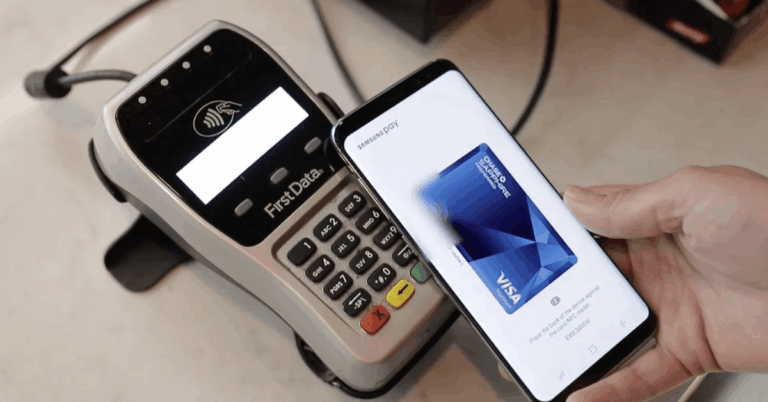
Using Google Pay in stores is simple and quick. Unlock your phone and hold it near the NFC reader. The transaction completes automatically, and you receive a confirmation message. Contactless payments reduce the need for physical cash or cards.
Online and In-App Purchases
It works across various e-commerce sites and apps. When checking out, select This app as your payment option.
It auto-fills your details for a faster process. This feature saves time while maintaining transaction security.
Sending and Receiving Money
You can transfer funds directly between contacts using Google Pay. Just choose the recipient, enter the amount, and confirm.
It’s a practical solution for splitting bills or sending quick payments. Transfers are instant and free in supported regions.
Security Features and Data Protection
Google Pay provides strong security to protect users’ financial information. Every payment is backed by multi-layer encryption and authentication. This ensures that your data remains safe throughout the process.
- Tokenization replaces sensitive card details with encrypted codes.
- Biometric Authentication uses fingerprint or facial recognition for added protection.
- Fraud Detection automatically monitors unusual activities on your account.
- Device Protection
- Even if your phone is lost, your money remains secure. You can lock or erase data remotely through your Google account.
This app never stores or shares your full card information. It focuses on privacy while ensuring payment efficiency.
Managing Your Google Pay Account
Managing your Google Pay account helps keep transactions organized. It allows you to track spending, view history, and control linked accounts. Regular updates ensure smooth performance and safety.
Updating Your Information
You can add, remove, or update your bank details anytime. Keeping your app version current improves speed and functionality.
Always review your recent transactions to prevent unauthorized activities. Simple checks help maintain account accuracy.
Privacy Settings and Notifications
Google Pay allows you to customize privacy settings for better control. You can choose to enable or disable notifications for transactions.
Manage what information is shared with merchants or linked accounts. These controls give you complete command over your digital wallet.

Benefits of Using Google Pay
Using Google Pay saves time while keeping your payments secure. It offers multiple advantages that enhance your digital payment experience.
- Speed and Convenience: No need to carry physical cards.
- Security: Advanced encryption ensures safe transactions.
- Rewards: Access cashback and loyalty programs.
- Integration: Syncs easily with Google services and supported apps.
For Travelers and Shoppers
Google Pay works in different countries and supports currency conversion. Travelers can make payments without handling local cash.
Online shoppers benefit from its fast checkout process. It’s a dependable choice for global users.
Troubleshooting Common Issues
Sometimes, users may experience technical issues or payment delays. Knowing how to fix them keeps your experience smooth and reliable.
- Failed Transactions: Check internet connection or card validity.
- Card Not Verified: Re-enter details or contact your bank.
- App Not Updating: Clear cache or reinstall the app.
- Login Errors: Ensure correct Google account credentials.
These small steps usually resolve most common issues instantly.
Tips for Safe and Efficient Use
Understanding how to use Google Pay responsibly ensures long-term safety. Follow these practices to get the most from the app.
- Keep your app and device updated to prevent risks.
- Enable biometric locks for all payment authorizations.
- Avoid public Wi-Fi when making payments.
- Regularly monitor your transactions.
These precautions make your payment process smoother and safer.
Alternative Apps You Might Consider
Here are some other mobile payment apps you can explore:
- Apple Pay – Available on the App Store for iPhone and iPad users.
- PayPal – Downloadable from Google Play or the App Store depending on your device.
- Samsung Pay (now part of Samsung Wallet) – Can be installed via Google Play on compatible Samsung devices.
Comparing Google Pay with Other Wallets
It offers simplicity and broad compatibility without exaggeration. Similar platforms such as Apple Pay and PayPal provide comparable features but function differently. Below are some distinctions based on usability and scope:
- Accessibility: Supports both Android and iOS devices for wide user reach.
- Integration: Connects with Google services and other supported apps for convenience.
- Ease of Use: Offers straightforward setup and management.
- Coverage: Commonly accepted by many retailers and online platforms.
- Its overall functionality continues to make it a practical tool in mobile payment systems.
Why Google Pay Is Worth Using?
Digital payments are the future of finance. Learning how to use Google Pay helps you stay ahead in secure, cashless transactions.
It’s fast, trusted, and suitable for all users. Start using it today to simplify your financial activities.